SCHOOL MANAGEMENT SYSTEM · ZIMBABWE
One system for the whole school.
Enrolment, fees, attendance, results and parent communication — connected, so the bursar, the head and the parent are all looking at the same information.
Implementation is planned around your term calendar, not ours.
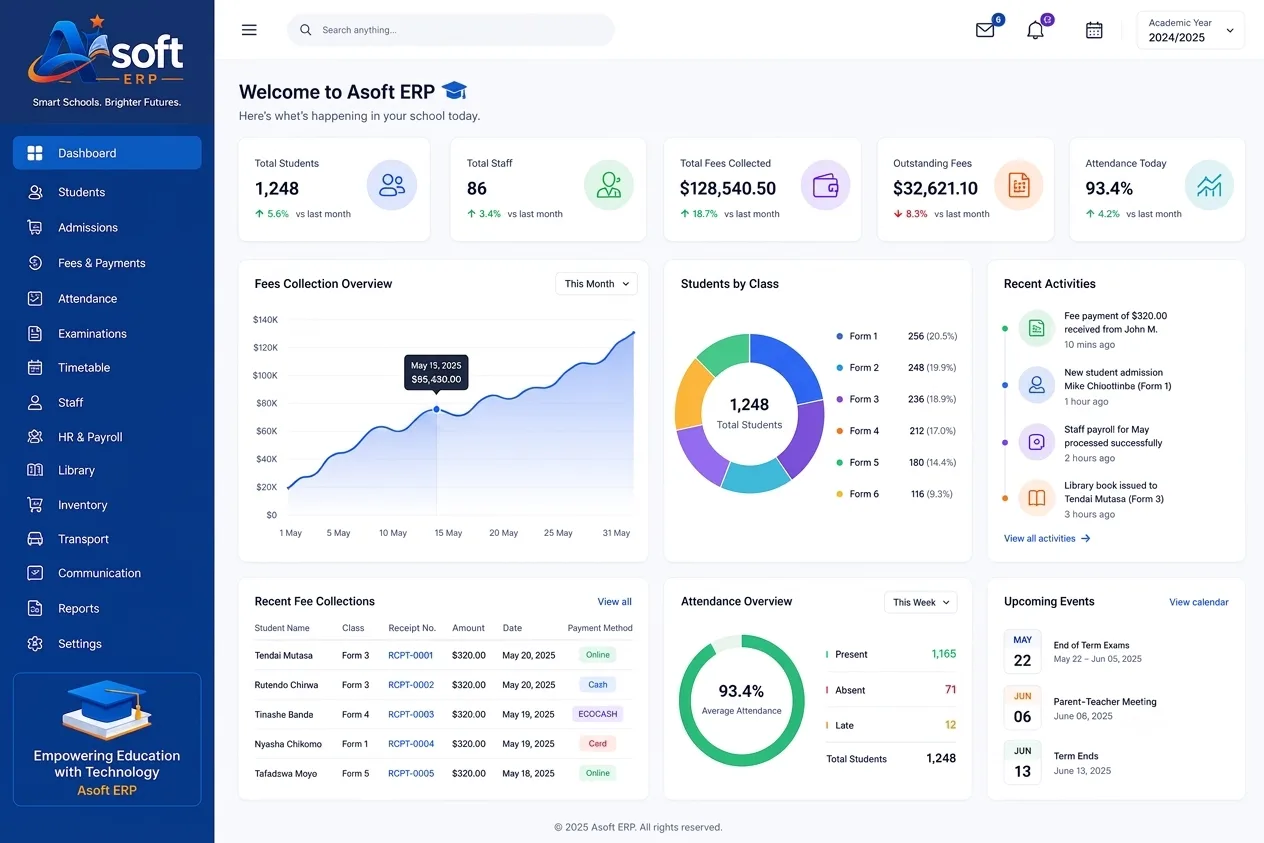
Arrears flagged and the reminder sent automatically, weeks before end of term.
Fee collection over two terms, once arrears became visible in week four rather than week thirteen.
Education
A private school, 780 pupils
- Problem
- Fee arrears were discovered at the end of term, when nothing could be done.
- Built
- ASOFT ERP fees, attendance and parent messaging, flagging an arrear and sending the WhatsApp reminder without a staff member deciding to send it.
- Result
- Arrears identified weekly. Collection up 19% in two terms.
Get started
Pick your band and pay. You are running today.
Pick your band, add what you need, pay for the first period and start using it. No sales call in the way — and if your finance office needs a document first, take the quote instead.
Choose the band that matches your size to see what it costs.
Step 1 of 5
How many students are enrolled
Step 2 of 5
Getting you onto it
One-off, charged with your first invoice.
Step 3 of 5
Extra modules
Charged with the subscription. Add or drop them at any renewal.
Step 4 of 5
Augustus AI
Answers enquiries on WhatsApp and on the site, day and night. Pick a tier or leave it off.
Step 5 of 5
Asolen AI
Turns your syllabus into lessons and marks submitted coursework against your rubric — a teacher approves both.
Choose the band that matches your size to see what it costs.
WHAT IS IN IT
From enrolment to graduation.
A school management system for Zimbabwe has to do ordinary things extremely well: total a register, chase a fee, print a report on time. Seven modules, on every band — the size of your school changes the price, not what you get.
The pupil
- Enrolment and student management
- Admissions, guardians, class allocation and transfers, with every document and the full academic history attached to one profile.
- Attendance management
- Student and staff attendance from a daily register, with absenteeism tracking and reports the office does not have to compile by hand.
The money
- Fees tracking and accounting
- Fee structures, invoices, payments, balances and arrears, with receipts, expenses, income and financial reports in one ledger.
- Staff management
- Staff profiles, departments, roles, attendance and leave, with employment records kept payroll-ready.
The year, and everyone who asks about it
- Academic and examination management
- Subjects, classes, marks, assessments and examinations, with grading and report cards that reflect academic performance across the year.
- Timetable and scheduling
- Class timetables, teacher allocation, subjects, rooms and periods, with clashes caught before they reach a classroom.
Property and operations
- Property and asset management
- Furniture, computers, equipment and buildings tracked by allocation, condition and maintenance, with a full asset history.
Available add-ons
- Augustus AI
- Answers WhatsApp enquiries and qualifies leads, day and night.
- Asolen AI
- Plans the lesson, marks the work — a teacher approves both.
Each is quoted on the same quote as the system, not billed as a separate subscription.
WHAT IT CONNECTS TO
What it connects to, and what that saves the office.
A school system that cannot take an EcoCash payment, cannot message a parent on WhatsApp and cannot export a candidate list is a filing cabinet with a login screen.
Fees and money coming in
Parents pay the way parents actually pay
- Paynow
- EcoCash merchant code
- Bank statement import
- ZIMRA fiscalisation
Talking to parents
On the channel they will actually read
- WhatsApp Business
- Bulk SMS
- Parent portal
The academic year
Files in the layout the examination boards accept
- Examination candidate files
- Mark sheet import
- Timetable import and export
- Report card layouts
Staff, systems and data
It fits alongside what the school already runs
- PAYE, NSSA and bank files
- Excel and CSV everywhere
- Google Workspace for Education
- Augustus AI
- SilverOne ERP
When the line is bad
A register still gets taken
- Registers capture offline
- Text-first screens
- SMS as the fallback
IMPLEMENTATION
Four to eight weeks, planned around your terms.
The best time to start is a school holiday. The second best is week one of a term, when your enrolment data is at its cleanest.
WEEK 1
Discover
We walk the office. How a pupil is enrolled, how a fee is receipted, how a register becomes a report, and which of those steps only works because one person is very good at it.
WEEKS 2–3
Configure
Forms, streams, subjects, houses, fee structures, discounts, scholarships and the approval rules the bursary actually uses.
WEEKS 3–5
Migrate
Pupil records, guardians, opening fee balances, staff records, and as much academic history as exists in a usable form.
WEEK 6
Dry run
One full billing run and one full report run on real data, checked line by line against your own last term. Nothing goes to a parent from this run.
WEEKS 7–8
Go live and train
Enrolment and fees first, then attendance, then examinations. Not everything on one Monday, and never in the week reports are due.
Dates are set against your term calendar and written into the scope before you pay. We do not schedule a go-live in an examination week or a reporting week, and we will say no if you ask us to.
QUESTIONS
What heads and bursars ask first.
How do staff and parents get their logins?
Once the school takes up a package, we create the accounts and issue each member of staff their own login for the dashboard as part of setup — before the first day of implementation. Parent access to the portal is added the same way, per pupil, once enrolment is loaded.
Can we start in the middle of a term?
Yes, and it is common. We bring across the current pupil list and the fee balances as at the day you switch, run one billing cycle in parallel, then take over. What we will not do is move examinations and reporting mid-term — those wait for the term boundary.
Where is our data stored?
On managed Postgres infrastructure with daily backups, and we will tell you the exact region in writing before you sign. You can export everything at any time, in a standard format.
Who can see a pupil’s record?
Only the roles you allow, and the rule is enforced in the database rather than in the screens. A form teacher sees their own class. A subject teacher sees the pupils they teach and the marks they entered. The bursary sees fees. Medical and discipline notes are separately restricted, and every view of a restricted note writes an audit row.
Do parents need to install an app?
No, and deliberately so. Statements, attendance and reports arrive on WhatsApp or by SMS, and the parent portal is a web page that opens on an old handset over a weak connection. Asking eight hundred families to install an app is how a parent portal ends up unused.
Will it work for a group with more than one campus?
Yes. Each school is licensed on its own band by enrolment, with its own registers, fee accounts and reporting — there is no separate "group" tier or price. Where a group needs one consolidated view above the individual schools, that sits in SilverOne ERP with each ASOFT ERP feeding it.
Can we start small?
Yes. Most clients start with one module or one site and add from there.
What happens if we stop working with you?
You keep your data and your licences per the contract. No hostage-taking.
Do you work outside Harare?
Yes. Remote implementation across Zimbabwe, on-site training by arrangement.
Something not answered here? Ask us directly.
NEXT STEP
Show us your term. We will show you the system.
Thirty minutes, using your own fee structure and your own term dates rather than a demo school.
We work around your timetable, including school holidays.